
Telegram User ID Checker: Getting uid Values for a Phone or Username List
A Telegram id checker for lists: which TG Validator bulk services return a uid column, how to use it as a stable key, and what it does not tell you.
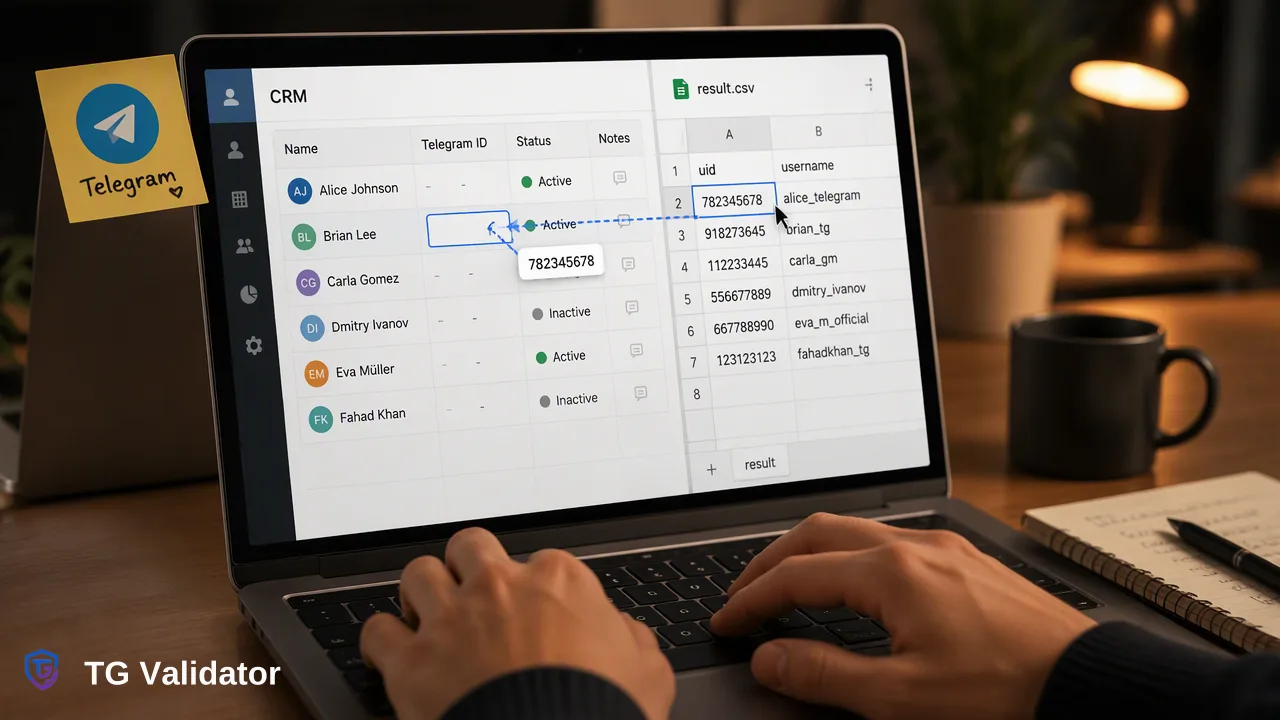
Three TG Validator bulk services return a uid column that teams can store as a stable key next to phone numbers or usernames.
A Telegram user ID is the numeric key Telegram uses internally for an account, and most "telegram id checker" advice points to lookup bots that read it from a single forwarded message. For a whole list, TG Validator returns a uid column in three asynchronous bulk services: tg_active_batch and tg_profile_batch for phone-number files, and tg_username_profile_batch for username files. The uid works as a stable key for deduplicating and reconciling your own records.
What a Telegram user ID is and where the usual advice comes from
Every Telegram account has a numeric user ID. Unlike a username, which the owner can change or remove, the number stays attached to the account, which is why developers and CRM administrators like to store it.
The common search advice for "find telegram user id" falls into three groups:
- Lookup bots. You forward a message or open a profile inside Telegram and a bot replies with the number. This is fine for one person you are already talking to.
- Self-hosted scripts. Open-source projects, for example the Telegram ID Finder Bot, run a bot you host yourself and report IDs of users, groups and channels.
- Phone-number scripts. Tools in the style of Bellingcat's telegram-phone-number-checker use your own Telegram API credentials to look up a number and may return a username and ID when the account allows it.
All three are built around a person at a keyboard or a developer running code under a personal Telegram account. None of them is a list workflow: you cannot hand them a few thousand rows and receive one file back with the results in order.
Which TG Validator services return a uid
A list-oriented check lives in the bulk services. Three of the five asynchronous types include a uid column:
| Service | Input file | uid returned | Other columns |
|---|---|---|---|
| tg_batch | Phone numbers | No | Registration only |
| tg_active_batch | Phone numbers | Yes | Registration, username, activedays |
| tg_profile_batch | Phone numbers | Yes | Registration, username, activedays, avatar URL and avatar-based estimates |
| tg_username_batch | Usernames | No | Account existence only |
| tg_username_profile_batch | Usernames | Yes | Existence, activedays, avatar URL |
The realtime tg service, used by the single-number API check and the dashboard realtime tabs, reports registration status only and does not return a uid. If you need the key, move the list into a bulk task.
Rows where the service has nothing to report keep their place in the file, with empty optional columns. Plan your import so an empty uid is a normal row, not a failure.
Getting uids for a list step by step
- Pick the service that matches your input. Phone numbers go to tg_active_batch or tg_profile_batch; usernames go to tg_username_profile_batch. Choose tg_profile_batch only if you also want the avatar-based estimates, because the lighter tg_active_batch already returns the uid.
- Prepare the file. Use TXT or CSV with one entry per line. For phone numbers, use international numbers and keep the file to essentially one selected country, since phone-number bulk tasks need one country and files with a substantial share of other country codes are rejected. Mainland China, Hong Kong and Macau numbers are not supported in bulk tasks. Usernames need no country and may include or omit the @.
- Submit the task through the dashboard Bulk Check area or POST /api/v1/bulk-tasks, authenticating with your X-API-Key header and never pasting a real key into shared documents.
- Poll for completion with GET /api/v1/bulk-tasks/{id}, no more often than every 30 seconds. The status is processing, success or failed.
- Download result.csv and join it back to your source list on the identifier column, which echoes each original entry.
Balance for the task is reserved at submission, charged for entries that returned results, and the unspent reserve is released at completion. A failed task releases its full reserve. Check the current pricing page and API documentation for the rates and per-task limits that apply to your chosen service.
Using the uid as a stable key
Once the column is in your CRM or warehouse, the uid helps with data hygiene rather than with anything about the person.
Deduplicate across sources. The same account can arrive as a phone number from a form, a username from a community export and a username again after a rename. If both rows return the same uid, they point at one account, and you can merge them into one record.
Survive username changes. Store the uid beside the username you collected. When a handle changes later, you still match the record by uid rather than creating a duplicate.
Create a join column for exports. Many internal tools handle numeric keys better than free-text handles. A uid column makes it easier to build joins between a contact table and a campaign table.
Keep it separate from identity fields. Do not store the uid in a field labeled "verified user" or use it to claim you know who a contact is. It is a technical key, and the registration signal behind it describes account presence at check time.
A short governance note: decide in advance who can see the column, how long you keep it and whether your privacy notice covers it. Those choices belong to your team and your jurisdiction, not to the checker.
What the uid does not give you
The column has a narrow job, and the limits help you avoid mistakes in how you use it.
- It does not reveal a phone number from a username, or the reverse, unless the same file service already reports it.
- It does not expose private chats, group membership or contact lists.
- It does not show who is online. The activedays value, where present in a bulk result, is approximate days since last activity and is not live presence.
- Avatar-based age, gender and skin-colour values in tg_profile_batch are estimates produced from the picture, not verified facts about a person.
If you need to look up a single ID inside Telegram while chatting with someone, a lookup bot is simpler. If you need a consistent key across thousands of rows, the bulk services give you one file and one process to document.
FAQ
Which TG Validator services return a uid?
tg_active_batch and tg_profile_batch return it for phone-number files, and tg_username_profile_batch returns it for username files. The realtime tg service and tg_batch and tg_username_batch do not include a uid.
How can teams use a uid in a CRM?
Teams store it beside the phone number or username as a stable key. It helps merge duplicate records and keep matching after a username change.
Can a uid be found for a username list without a phone number?
Yes. tg_username_profile_batch accepts usernames, with or without @, needs no country and returns the uid together with activedays and an avatar URL.
How should teams handle empty uid cells?
Treat an empty cell as a normal outcome for optional columns. Keep the row, flag it for your own review rule and avoid treating it as a failed import.
Does the realtime check return a uid?
No. The realtime tg service returns registration status for an E.164 number. Move the list to a bulk service when the uid is needed.
Learn More
Choose the product information that fits the next step in your workflow.